How to Find Your Bitcoin Address on Coinbase
You signed up for Coinbase — now the debt form is asking for your bitcoin address, and you're staring at the app wondering where it is. It's two taps away. Here's exactly how to find it.
In-article ad slot — paste Google AdSense code here
Before you start
You'll need the main Coinbase app (blue icon) or the Coinbase website — not the separate "Coinbase Wallet" app, which is a different product. Make sure you're signed in and have finished setting up your account. New accounts sometimes need to complete identity verification before the Receive button appears.
If you haven't signed up yet, you can do it here: Sign up for Coinbase.
On the Coinbase website
The pictures below are real screenshots from Coinbase's own guide. Here's the flow:
Step 1: Sign in and click Receive crypto
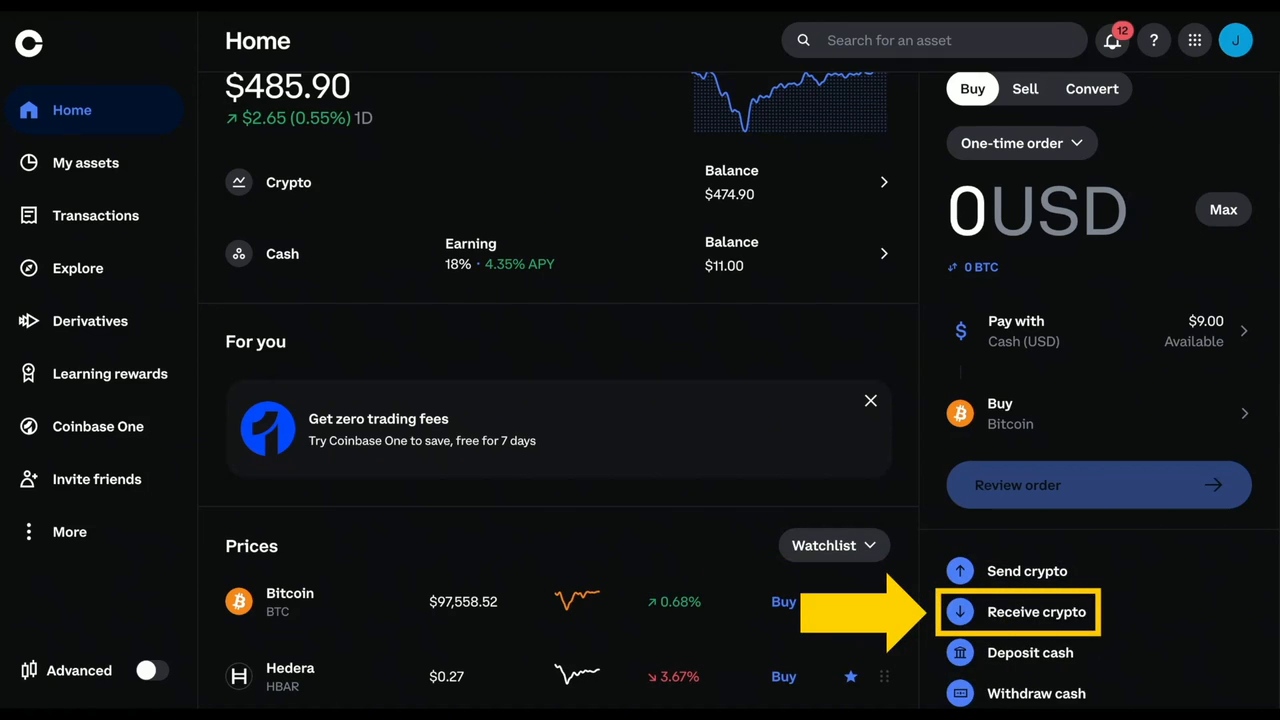
Sign in to coinbase.com. On your dashboard, click Receive crypto in the menu on the right.
Step 2: Select Bitcoin
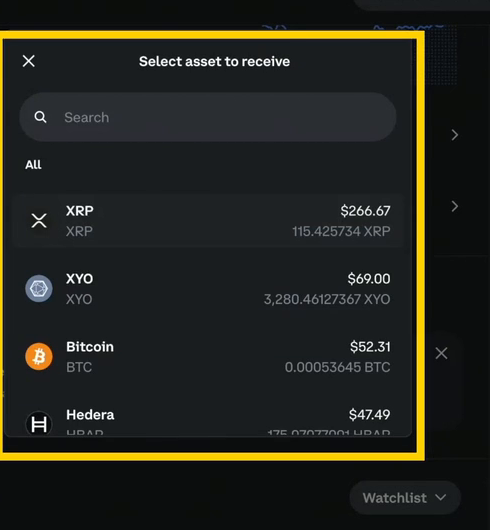
A "Select asset to receive" box pops up. Click Bitcoin (BTC) in the list. If it asks, select the Bitcoin network.
Step 3: Copy your address
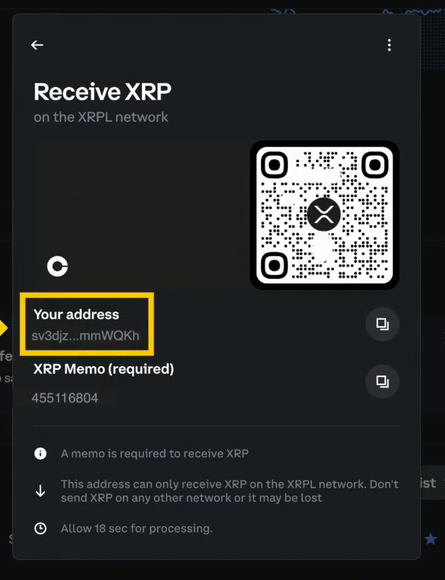
Your bitcoin address appears, along with a QR code. Click the copy icon next to the address to copy the full address to your clipboard. (Coinbase's demo shows this screen for XRP — yours will say "Receive Bitcoin" and show your bitcoin address instead. The layout is the same.)
Step 4: Paste it into the debt form
Go back to the debt submission form and paste the address into the Bitcoin address field. That's it — you're done.
On the Coinbase app
On the mobile app the steps are nearly the same:
- Open the Coinbase app and sign in.
- From the home screen, tap Transfer, then Receive crypto.
- Select Bitcoin as the asset you want to receive (and the Bitcoin network, if it asks).
- Your address and QR code appear — tap the copy icon to copy the address, then paste it into the debt form.
What your address looks like
A bitcoin address is a long string of letters and numbers, like this:
bc1qxy2kgdygjrsqtzq2n0yrf2493p83kkfjhx0wlh
Newer addresses start with bc1q; older ones start with 1 or 3. Any of those is fine. Never type it by hand — always use the Copy button. One wrong character sends the money somewhere it can never be recovered from.
Stay safe
- Your address is safe to share. It's like an account number for receiving — it can only receive money, never send it.
- Never share your password, your 2FA codes, or your 12-word recovery phrase. Coinbase will never ask for them, and neither will we.
- Only send Bitcoin to a Bitcoin address. Every cryptocurrency has its own address type — sending the wrong coin to an address can mean losing it permanently.
- Double-check before you paste. Glance at the first few and last few characters of the address in the form to make sure they match what Coinbase showed you.
Got your address? Head back and finish your submission — it takes less than a minute from here.